





Apollo.io
Connect Apollo.io as your access review source using an APImaster key so that the platform can list your account team members and permission profiles.
The platform reads the team members of your Apollo.io account through Apollo RESTAPI so that you can review who has access. the platform reads the Apollo team colleagues (account locations), not the prospectus or contact records.
Prerequisites
Section entitled ‘Prerequisites’- the platform organization administrator access
- The Apollo account admin role, or a permission profile that grants the creation of the API key
- A master API key Creat cu Set as master key (Toggle) because the platform reads the Get a List of Users endpoint only with the primary key
Collected Fields
Section entitled “Collected Fields”| the platform field | Apollo.io field | Notes |
|---|---|---|
| Name | name |
Returns to first and last name, then email |
email |
||
| Role | role |
Name of Apollo user permission profile |
| Admin | role |
Tagged as administrator when the role name is equal to Admin |
| Status | Not supported | |
| MFA | Not supported | |
| Last login | Not supported | |
| External ID | id |
Stable ID used to track your account through reviews |
| Created at | Not supported |
Step 1: Create an API Key
Section entitled “Step 1: Create anAPIKey”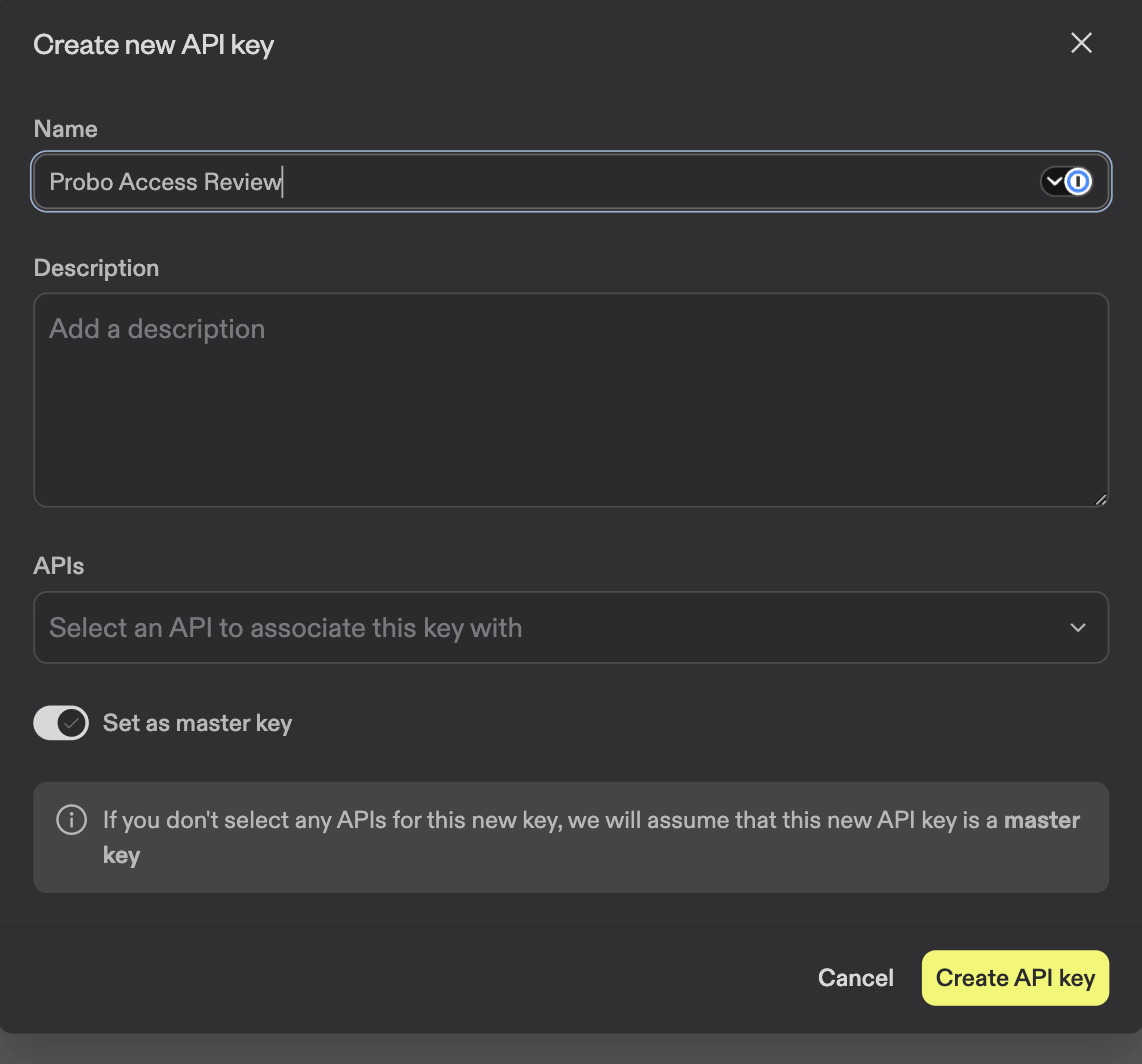
- In Apollo (registered as an admin account), go to Settings > Integrations > API Keys > Create new key.
- Name of the key (for example
Probo Access Review) and switch to Set as master key so that they can reach the end point Get a List of Users that the platform reads. - Save the key immediately and store it securely. Apollo may no longer show it.
Step 2: Connect in the platform
“Step 2: Connect in the platform”- On the platform, go to Access Reviews > Sources > Add Source.
- Find Apollo.io, click API KeyPut the key and click Connect.
Name of Source Apollo.io (the name of the fixed provider), because Apollo does not expose any stable points of the account name. the platform attracts account members into your campaigns.
Troubleshooting
Section “Troubleshooting”- Key rejected. Confirm that it is a master key created with Set as master key A non-master endpoint key is rejected because the endpoint Get a User List is only the primary key.
- No members appear. The key must be created by an account administrator (or a permission profile that grants the creation of the API key) and belong to the Apollo account you are reviewing.