





Scaleway
Connect Scaleway as your access review source using a secret IAM key and your organization ID to verify who has IAMReadOnly access to your account.
The platform reads your organization’s Scaleway IAM users through the Scaleway IAMAPI so you can check who has access.
Prerequisites
Section entitled ‘Prerequisites’- the platform organization administrator access
- A Scaleway API key whose carrier holds
IAMReadOnly(orIAMUserReadOnlypermission so that they can list users of the Organization. Owner This is done by default. - Your Scaleway Organization IDWithin the console Organization Settings (use Copy ID Name of the organization)
Collected Fields
Section entitled “Collected Fields”| the platform field | Scaleway field | Notes |
|---|---|---|
| Name | first_name and last_name |
Returns to the username, then the email |
email |
||
| Role | type |
owner → Owner, member → Member |
| Admin | type |
It falls as an administrator when type is owner |
| Status | status and locked |
Inactive when the account is blocked or the invitation is still waiting |
| MFA | two_factor_enabled |
If two-factor authentication is enabled (returns to the flag ___ZBT_I18N_RUNTIME_BLOCK_185__) |
| Last login | last_login_at |
When the user logged in the last time |
| External ID | id |
Stable ID used to track your account through reviews |
| Created at | created_at |
When the user has been added to the organization |
Step 1: Create an API Key
Section entitled “Step 1: Create anAPIKey”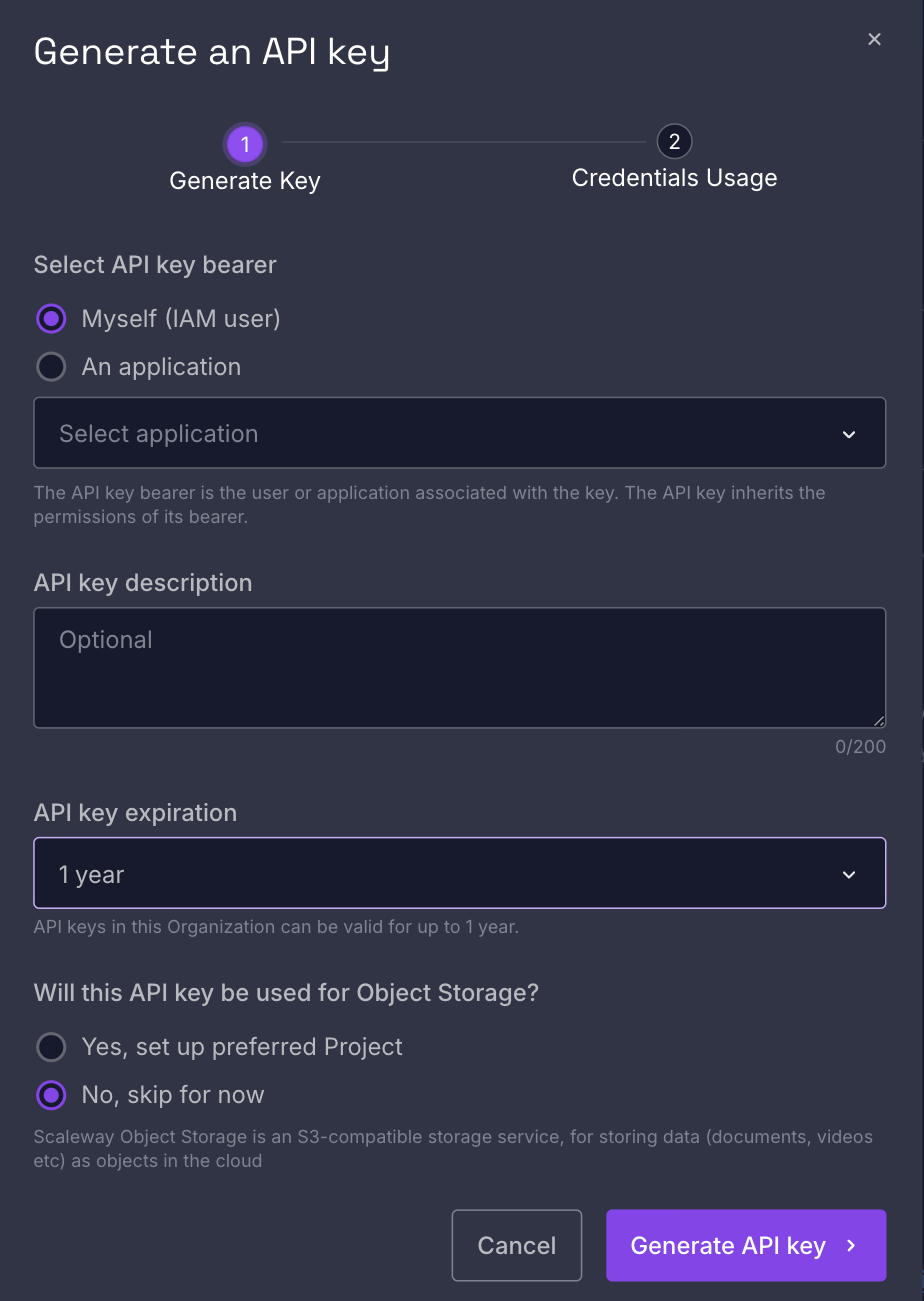
- In the Scaleway console, open IAM & API keys from the menu on the upper right, then API keys tab.
- Click Generate API key, choose the bearer (or an IAM application that owns the
IAMReadOnlypermission), add a description (for example,Probo Access Review) and generate it. - Copy the secret key (a UUID) and store it securely. It is displayed only once.
Step 2: Connect in the platform
“Step 2: Connect in the platform”- On the platform, go to Access Reviews > Sources > Add Source.
- Find Scaleway, click API Key, paste the secret key, enter your Organization ID (from Organization Settings), and click Connect.
The platform names the source by your organization and attracts IAM users to your campaigns.
Troubleshooting
Section “Troubleshooting”- Key rejected. Confirm that you have introduced secret key (a UUID), not the access key (
SCW…) or the organization ID. - No users appear. The key user needs the
IAMReadOnlypermission or the ___ZBT_I18N_RUNTIME_BLOCK_197__ permission. Organization ID must match the organization you are examining.