





Qovery
Connect Qovery as an access review source using an organizational token API with the administrator role so that the platform can list the members of your organization.
The platform reads your Qovery organization’s members through QoveryAPI so you can check who has access.
Prerequisites
Section entitled ‘Prerequisites’- the platform organization administrator access
- The Owner, Admin or DevOps role in Qovery. These three embedded roles cover the organization setting, which includes API tokens. A custom role can not generate a
- The Organization IDis an UUID, and Qovery uses it as a path segment
{organizationId}alAPI. With the organization open in the Console, the ID is the next/organization/segment in the address bar
Collected Fields
Section entitled “Collected Fields”| the platform field | Qovery field | Notes |
|---|---|---|
| Name | name |
Returns to nickname, then to the email address |
email |
||
| Role | role |
OWNER, ADMIN, DEVELOPER and VIEWER are displayed as Owner, Administrator, Developer and Viewer, suitable for any case. Any other value is displayed as Qovery returns it, and a member without a role is listed without one. |
| Admin | role |
Tagged as administrator when role is OWNER or ADMIN, suitable for any case |
| Status | Not supported | |
| MFA | Not supported | |
| Last login | last_activity_at |
Qovery documents it as the last time the user was logged in. It leaves empty when the field is absent or is not a RFC 3339 timestamp |
| External ID | id |
Stable ID used to track your account through reviews |
| Created at | created_at |
When a member joins the organization |
The platform passes any Qovery member returns without an email address.
Step 1: Create an API Token
Section entitled “Step 1: Create anAPIToken”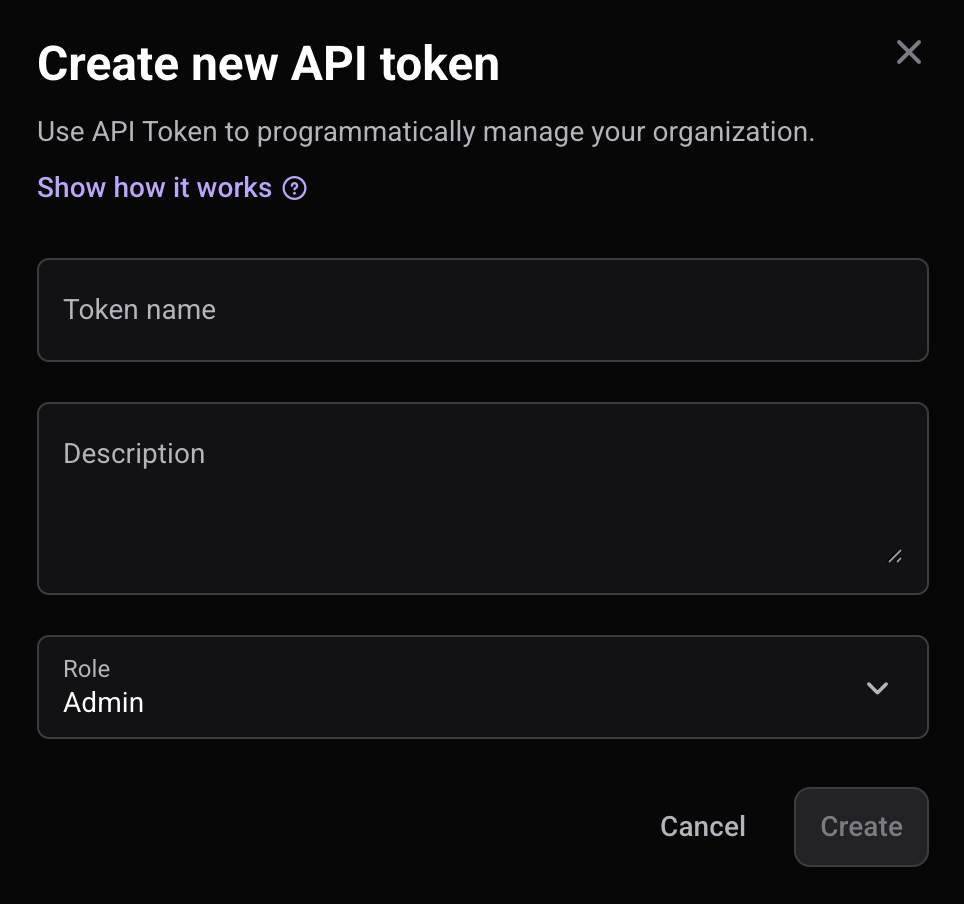
- In the Qovery ConsoleSigned as Owner, Admin or DevOps open the organization you want to review, click on Settings tab, then open the API token section.
- Click Add new, enter a Token name (for example
Probo Access Review) and a Description, then pick Admin in the Role list. - Click CreateQovery displays it once and you can’t recover it later, so you can safely store it.
Step 2: Connect in the platform
“Step 2: Connect in the platform”- On the platform, go to Access Reviews > Sources > Add Source.
- Find Qovery, click API KeyPut yourself in the box, enter Organization ID, and click Connect.
The platform names the source after your organization and attracts its members to your campaigns.
Troubleshooting
Section “Troubleshooting”- Token rejected. Qovery responds to a missing or invalid token with a 401.Confirm value is an organizational tokenAPIwhich is still listed under Settings > API token, and not a Console session token, which API only accepts as a credential ___ZBT_I18N_RUNTIME_BLOCK_192__.
- No members appear. A token only carries the permissions of the role with which it was created, and Qovery reserves member management for the Owner and Administrator roles. A token created with a narrower role can be rejected at the end point of the members. Admin Role and confirmation Organization ID It belongs to the same organization as the token.
- Organization ID unknown. Open your organization in Console and read the UUID that follows ___ZBT_I18N_RUNTIME_BLOCK_192__ in the URL or call ___ZBT_I18N_RUNTIME_BLOCK_193__ with the token to list the organizations you can see, each with
id. - Token creation is unavailable. Only the built-in owner, administrator, and DevOps roles can generate API tokens. A custom role cannot, so ask someone who holds one of these roles to create the token.